

How to Write a Bio for Instagram: Tips, Ideas & Examples
Have you ever landed on an Instagram profile and instantly hit the “Follow” button? Chances are, it wasn’t just their photos that convinced you—it was their Instagram bio.
You only have about three to five seconds to make a first impression on social media. Your bio is your digital elevator pitch. If it’s confusing or blank, people will simply scroll away. But if it’s sharp, clear, and engaging, it can turn casual visitors into loyal followers and even paying clients.
If you are wondering how to write a bio for Instagram that actually converts, you are in the right place. In this guide, we will break down the essential elements of a winning bio, share ready-to-use templates, and reveal the best Instagram SEO tips.
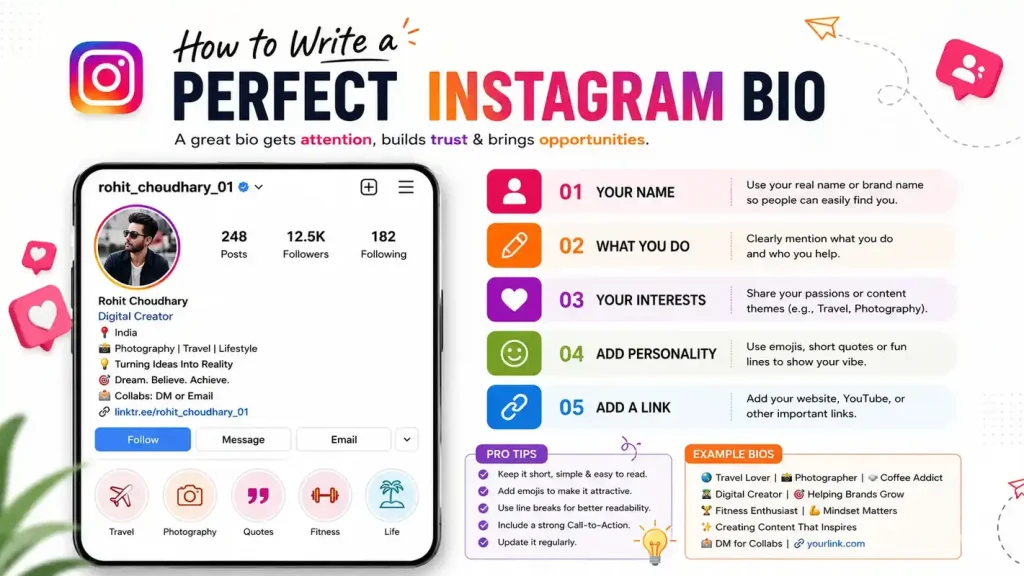
What Is an Instagram Bio?
An Instagram bio is the small section of text located right beneath your username on your Instagram Profile. It is designed to give visitors a quick snapshot of who you are, what you do, and why they should care.
However, you don’t have endless space to tell your life story. The Instagram bio character limit is strictly 150 characters. This means every word, emoji, and space counts.
Why Your Instagram Bio Matters
Your bio is much more than just a place to drop a quote. It plays a critical role in your overall social media strategy:
- First Impressions: It immediately tells people if your content is relevant to them.
- Personal Branding: It establishes your unique voice, tone, and authority.
- Action Driver: A well-crafted Call to Action (CTA) drives traffic to your website, YouTube channel, or storefront.
- Searchability: Utilizing the right keywords helps your profile show up in Instagram’s search bar.
Elements of a Good Instagram Bio
Before you start writing, you need to understand the building blocks of a highly effective profile.
Username & Display Name
Your username (the @name) is your unique identifier. Your Display Name (the bold text above your bio) is completely separate. Since both are searchable, never waste your Display Name by just repeating your username. Use it to state your profession or niche.
Your Niche or Profession
Tell people exactly what you do. Are you a video editor, a fitness coach, or a tech vlogger? Clarity always wins over being overly clever.
Emojis
Text walls are boring. Emojis break up the text, save character space, and add visual appeal. Use them as bullet points to list your skills or interests.
Call to Action (CTA) & Link in Bio
Instagram only gives you one clickable link in your bio. You must tell people why they should click it. Phrases like “Watch my latest video 👇” or “Play free games here ⬇️” work perfectly.
How to Write a Bio for Instagram
Crafting the perfect bio doesn’t have to be complicated. Follow these simple steps to put it all together:
- Define Your Goal: Do you want more YouTube subscribers, freelance clients, or website traffic? Your goal dictates your bio’s message.
- List Your Keywords: Identify 2-3 words related to your industry.
- Draft Your Pitch: Write a one-sentence summary of what you offer.
- Format for Readability: Use line breaks to make it skimmable.
- Add Your Link: Insert your URL and a strong CTA pointing down to it.
Pro Tip: While you can use an Instagram bio generator to brainstorm ideas, always tweak the results to ensure they sound human and authentic to your personal branding.
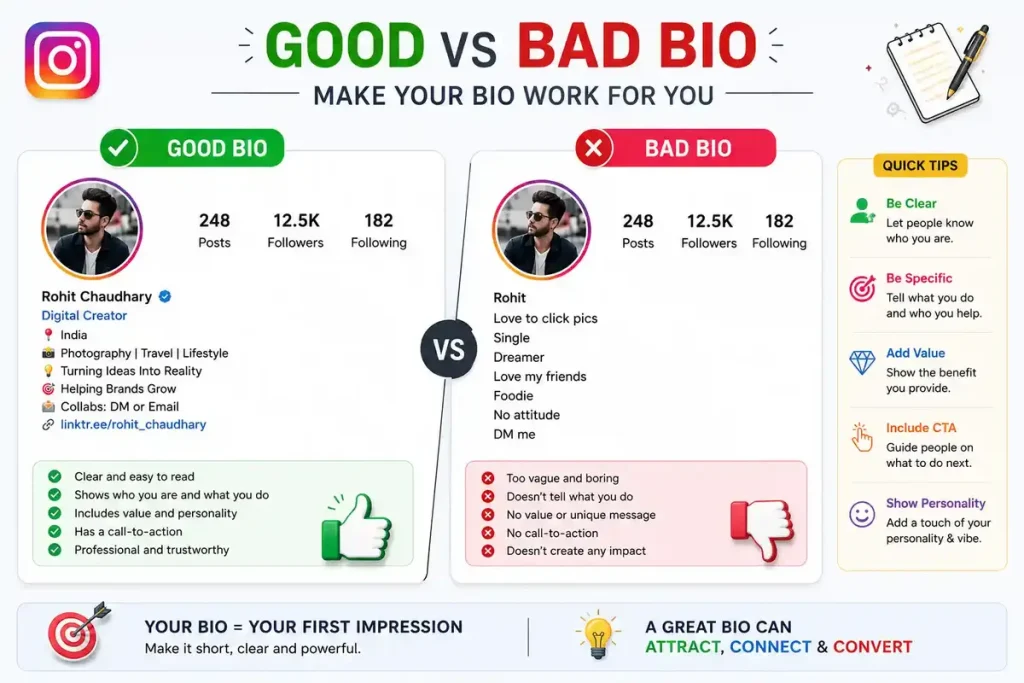

Best Instagram Bio Templates
If you are stuck staring at a blank screen, try using an Instagram bio template. Just fill in the brackets with your own information:
Template 1: The Professional
[Your Title/Profession] 💼
Helping [Target Audience] achieve [Result] 🚀
📍 Based in [Your City]
👇 Click here for my portfolio!
[Link in Bio]
Template 2: The Creator
Creating [Type of Content] 🎨
New video every [Day of the week] 🎬
Let’s collaborate: [Email Address] 📧
Watch the latest upload 👇
[Link in Bio]
Instagram Bio Examples
Let’s look at some practical Instagram bio examples to see how these templates look in the real world.
Example 1: The Freelance Professional
Name: Web Admin & Video Editor
🎬 Crafting cinematic videos & motion graphics
⚙️ cPanel, SEO & Website Setup Expert
📍 Delhi, India
👇 Need a custom edit? DM me!
[Link]
Example 2: The Content Creator
Name: Tech & Gadgets | Truly_New
🚀 Exploring Tech, Animations & General Knowledge
🎯 On a mission to simplify technology
🔔 Subscribe to the channel 👇
[YouTube Link]
Example 3: The Platform Builder
Name: Promax Games 🎮
🕹️ Your hub for the best free online games
⚡ Play instantly, no downloads required!
🏆 Can you beat the high score?
👇 Start playing now!
[Website Link]
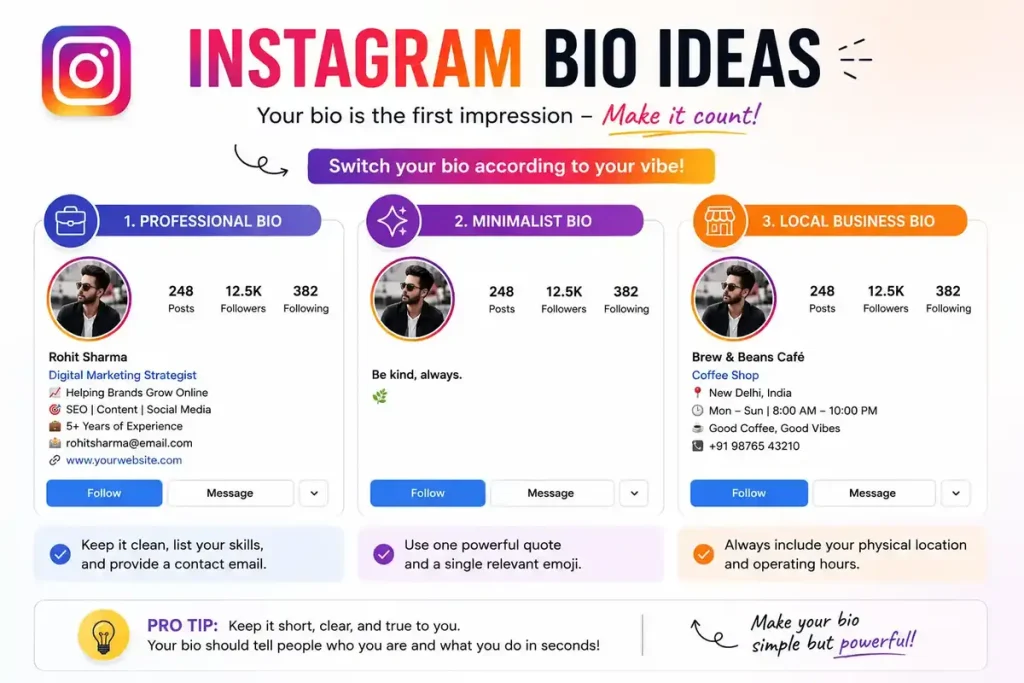
Instagram Bio Ideas
Depending on your profile’s vibe, you might want to switch things up. Here are a few quick Instagram bio ideas:
- For a professional instagram bio: Keep it clean, list your skills, and provide a contact email.
- For a minimalist bio: Use one powerful quote and a single relevant emoji.
- For a local business: Always include your physical location and operating hours.
Instagram Bio SEO Tips
Did you know your bio can help you rank better on the app? Instagram SEO is incredibly important for organic growth.
- Optimize the Name Field: As mentioned earlier, add your core keyword next to your name (e.g., “John | Tech Reviewer”).
- Use Industry Keywords: Naturally weave words your audience might search for into your bio text.
- Tag Related Accounts: If you run multiple pages, tag them using the “@” symbol to interconnect your audience.
Common Mistakes to Avoid
When figuring out how to write a bio for Instagram, make sure you dodge these common pitfalls:
- Ignoring the character limit: Don’t write a giant paragraph that gets cut off.
- No CTA: Never leave your “Link in Bio” hanging without telling people what it is.
- Too many hashtags: Avoid stuffing hashtags into your bio; they look spammy and drive people away from your profile.
FAQs
Here are some of the most frequently asked questions about optimizing an Instagram profile.
How long can an Instagram bio be?
The Instagram bio character limit is exactly 150 characters. This includes spaces, emojis, and punctuation.
What should a professional Instagram bio include?
A professional bio should include your job title, the specific value you provide to clients, a way to contact you (like an email address), and a link to your website or portfolio.
Should I use hashtags in my bio?
While you can make hashtags clickable in your bio, it is generally not recommended to use too many. They take up valuable character space and can lead users away from your profile. One branded hashtag is usually enough.
What is a Call to Action (CTA)?
A CTA is a short phrase that tells your audience exactly what you want them to do next. Examples include “Click the link below,” “Shop the sale,” or “Read the new blog post.”
How do I center my Instagram bio?
To center your bio, you need to open a notes app on your phone, type your bio, and use the spacebar to push the text toward the middle. Then, copy and paste it into your Instagram profile settings.
Are Instagram bio generators worth using?
An Instagram bio generator can be a great starting point if you have writer’s block. However, you should always edit the generated text to ensure it matches your unique voice and personal brand.
Where do I put my website link?
Do not put your URL in the 150-character bio text area, as it will not be clickable. Instead, paste your link into the specific “Website” or “Links” field in your profile editing settings.
How often should I update my bio?
You should update your bio whenever you have a new major project, a new YouTube video, a seasonal sale, or if you rebrand your business. Keeping it fresh gives followers a reason to keep checking your profile.
Conclusion
Your Instagram profile is your digital business card, and learning how to write a bio for Instagram is the first step toward building a strong, recognizable brand. By combining clear formatting, relevant emojis, targeted keywords, and a compelling Call to Action, you can easily turn profile views into meaningful engagement.
Take a few minutes today to review your current setup, grab one of our instagram bio tips or templates, and give your profile the professional upgrade it deserves!